Skip to main content
Back to top
Ctrl
+
K
Znuny documentation
Search
Ctrl
+
K
About Znuny
Release overview
Znuny 7.3.6
Znuny 7.3.5
Znuny 7.3.4
Znuny 7.3.3
Znuny 7.3.2
Znuny 7.3.1
Installation Instructions
Update instructions
Patch Level Update
Update to Znuny 7.3
Understanding the Software
Articles in Znuny
Customers and Customer Users
Ticket Escalation
Groups and Roles in Znuny
Using Multiple Frontend Servers
Ticket Lock
Ticket Owner and Responsible
Ticket Participation in Znuny
Priorities in Znuny
What are Queues
Ticket States
Ticket Types
Administrator Interface
Manage User Access
Customers and Customer Users
Multi-Company Access for Customer Users
Manage Groups
Manage Roles
Manage User Backends
Synchronization Options
Configure SAML backends for single sign-on (SSO)
Examples
Manage Users (Agents)
Session Management
Adding a Team (Queue)
Classification Data
Ticket Priorities
Ticket States
Ticket Types
Services and Service Levels
Managing Service Level Agreements
Managing Services
Calendar Administration
Managing Calendars
Import Appointments
Appointment Notifications
Managing Communication
Communication Templates
Automatic Responses
Salutations
Team Signatures
Manage Article Colors
Authentication
OAuth2 Token Administration
Two-Factor Authentication
System Mail Management
System Email
SMTP Settings
Configure Mailbox Collection
Manage Outbound Email Profiles
Securing Communication
Access Control Lists (ACL)
Extend Ticket Data (Dynamic Fields)
Web Service
Checkbox
Date
Date/Time
Dropdown
Multiselect
Textarea
Text
Dynamic Field Screens
Ticket Attribute Relations
Automate Tasks
Email Filtering
Scheduled Tasks (Generic Agent)
Ticket Notifications
Process Management
Manage Processes
Activities Element
Activity Dialogs
Transitions
Condition Types in Transitions
Transition Actions
Generic Information
Create an Appointment
Remove an Appointment
Update an Appointment
Update a Configuration Item
Incrementing a Dynamic Field Value
Set a Pending Time
Delete a Dynamic Field
Invoke a Web Service
Link Objects Together
Create an Article
Send an Article
Create a Ticket
Set a Ticket Customer
Set a Dynamic Field
Lock a Ticket
Set a Ticket Owner
Set a Ticket Priority
Set a Ticket Queue
Set a Ticket Responsible
Set a Ticket Service
Set a Ticket SLA
Set a Ticket State
Set a Ticket Title
Set a Ticket Type
Manage Ticket Subscriptions
Process Quick Start (Ready2Adopt)
An Example Process
Process Ticket Categories
Web Services
General Configuration
Network Transport Configuration
Provider
Requester
Invokers
Special Features
Web Service Notification Transport
Example web services
GenericTicketConnectorREST
Mattermost
MS Teams
Web Service Quick Start (Ready2Adopt)
Installing Features
System Configuration
Managing Time Zones
Translating Terminology
Support Data Collector
Granting Limited Admin Privileges
System File Support
Agent Interface
Overviews
View by Queue
View by Service
My Locked Tickets
Ticket Process Category Overview
View My Responsible
View Watched Tickets
View by Status
View Escalated Tickets
Perform a Bulk Action
Search Results
View Mentions
Working with Tickets
Common Features
Creating a Draft
Bounce a Communication
Close a Ticket
Answering Communications
Assign a Customer User
Compose a New Mail
E-Mail New Ticket
Resend an Email
Forward a Communication
Change Metadata (FreeText)
View the History
Lock/Unlock a Ticket
Linking Tickets To Objects
Merge Tickets
Sort a Ticket
Create a Note
Assign the Ticket
Set a Reminder
Caller Phoned-in Update
Call a Customer
Record a Ticket
View Message Source
Print a Ticket
Set the Priority
Become the Responsible Agent
Search for Tickets
Watch a Ticket
Manage Mentions
View Ticket Details
Working With Calendars
Calendar Overview
Adding Calendar Events
User Toolbars
Activity Notifications
Last views
Personal Settings
Agent Dashboards
Working with Statistics
Customer Interface
Customer User Dashboard
Customer User Preferences
Starting Processes
Browse Processes
Creating Tickets
Viewing Tickets
Answering Tickets
Searching Tickets
Operating Znuny
Advanced Statistics
Article Storage
Cron Scheduler Task Management
Debugging and Logs
Screen Configuration
SQL Box
Cloning a System for Staging or Development
Planned Maintenance
The Archive System
Command Line Interface
Advanced Statistics
ITSM Features
Configuration Management (CMDB)
View Configuration Items
Create a Configuration Item
Viewing a CI
Update a Configuration Item
Add New Configuration Item Classes
ITSM Service Level Management
Annexes
ACL Appendix
ACL Reference Guide
Configuration Item Definitions
System Permissions
Event Reference
Managing Entities
Entity Type Reference
Processing External Ticket Numbers
Keyboard Navigation (Hot Keys)
Placeholder Tags
E-Mail Headers
Statistics Attributes
Statistics Object Module Reference
Backing Up Your System
Database Reference
Data Model Overview
The Ticket Table
Lookup Tables
Articles
Dynamic Fields
History and Audit Trail
Roles, Groups, and Permissions
SQL Query Examples
Glossary
Choose version
.rst
.pdf
System Settings
Light
Dark
Close a Ticket
Close a Ticket
#
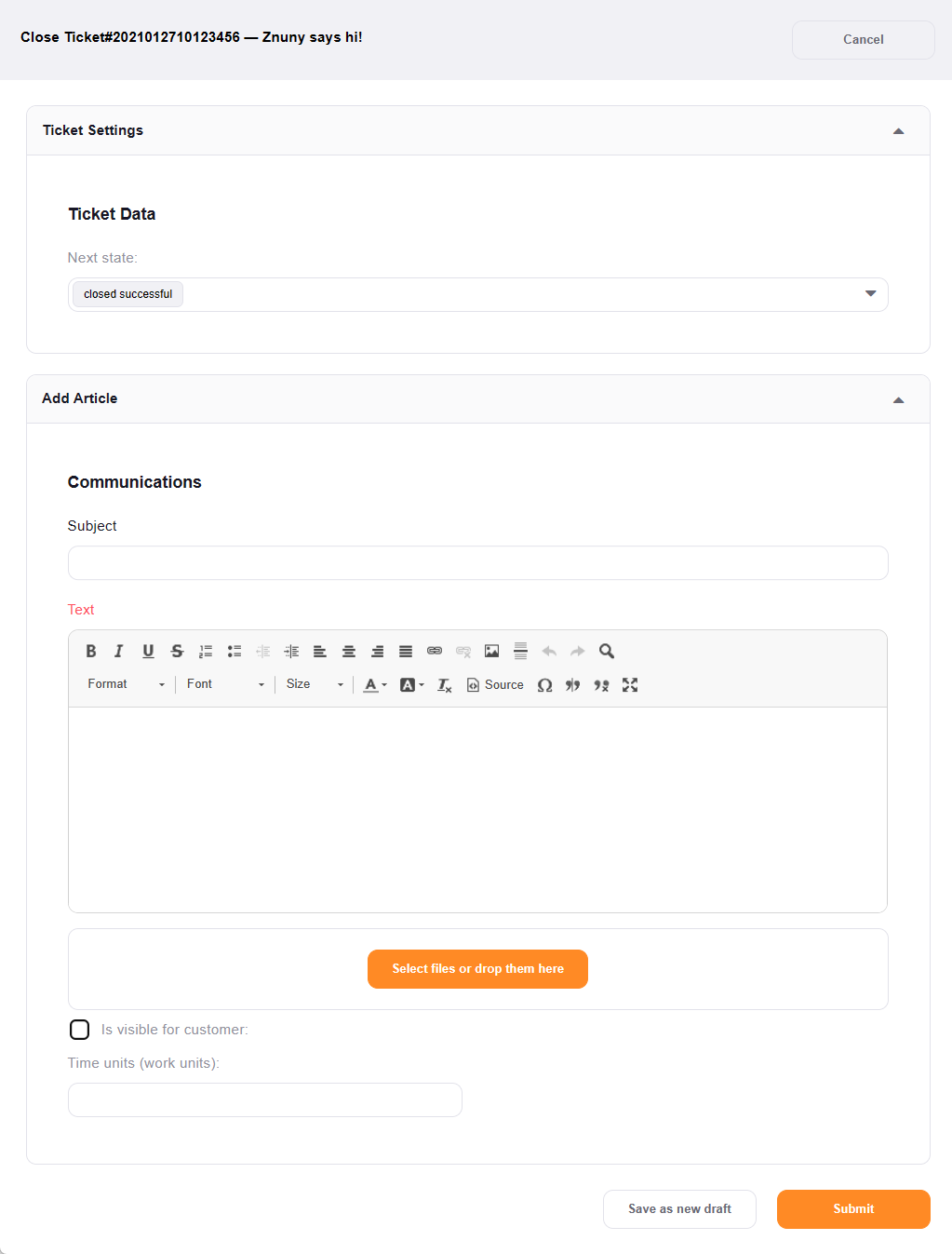
You may use this screen to close a ticket.
Select
Close
in the
ticket menu
.